Architecture overview
Openflexo is a stack of components, each in its own repository, built one on top of the other. This page gives the map; the repository map lists every repository, Component versions says which versions go together, and Runtime covers what happens while it runs.
The layers
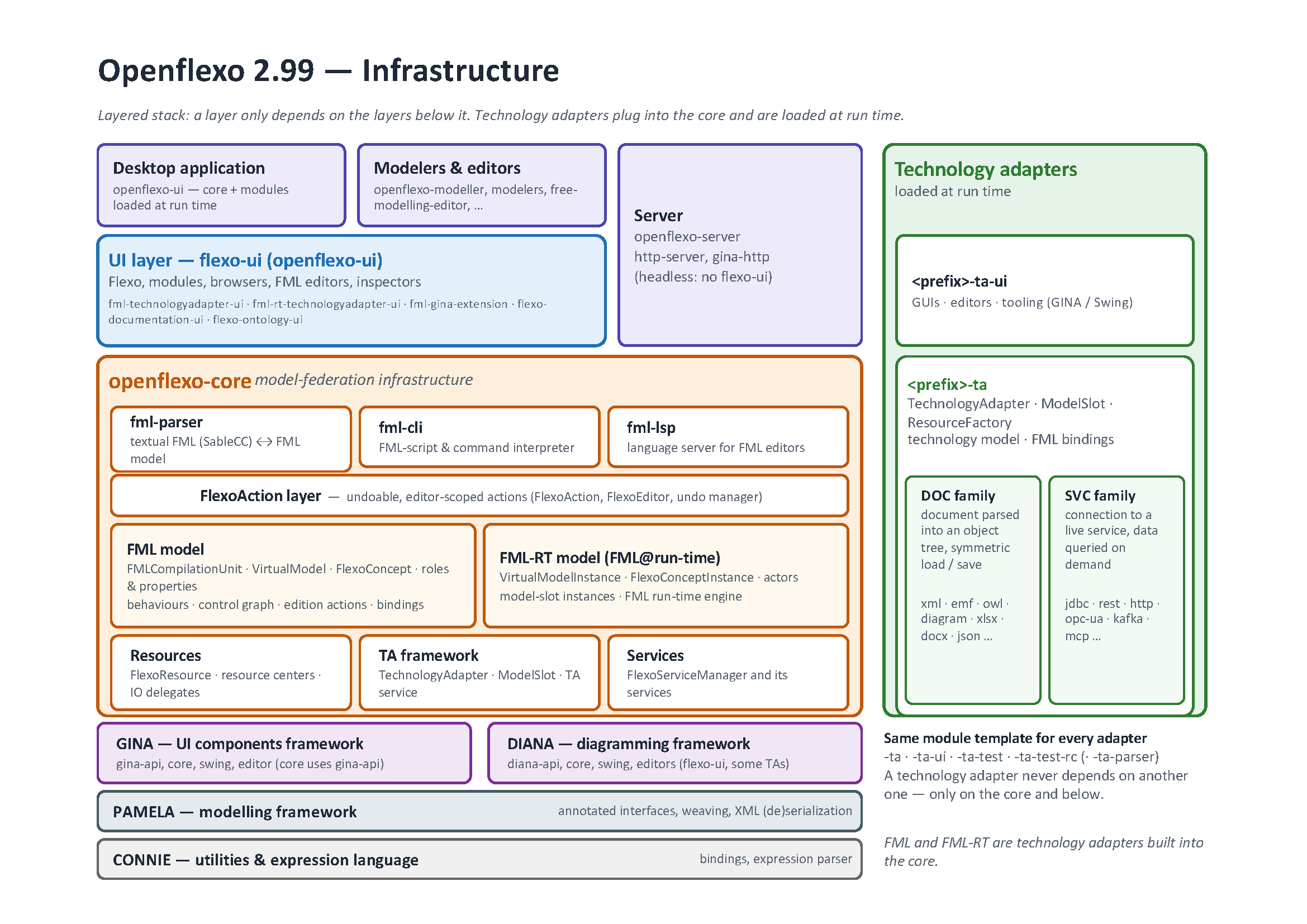
Layering is strict, bottom-up: a lower layer never depends on a higher one. FML and FML-RT are technology adapters built into the core.
| Layer | Repositories | What it provides |
|---|---|---|
| Build | openflexo-buildplugin | the Gradle plugins every repository builds with, and the version of every component |
| Foundations | openflexo-utils | the bottom layer, shared by every repository: the resource locator, the logging, the toolbox and the test utilities (from 3.0 on; they used to be split between connie and openflexo-utils) |
connie | the expression language and the bindings (connie-core, the default and Java expression languages and their parsers) | |
pamela | the modeling framework: annotated interfaces turned into stateful model objects (pamela-core, pamela-security-patterns) | |
gina, diana | the framework for user interfaces (widgets, the .fib components and inspectors) and the framework for diagrams and 2D drawing | |
p2pp | the parser and pretty-printer framework used by the FML parser and the FML editor; it needs Connie, hence its own repository (from 3.0 on, it was part of openflexo-utils before) | |
| Core | openflexo-core | the federation engine and the FML language: flexo-foundation (resources, resource centers and the FML runtime model), fml-parser (the FML grammar), fml-cli (the command interpreter), fml-lsp, the ontology support |
| User interface | openflexo-ui | the shared user interface of the applications, built on Gina and Diana |
| Technology adapters | openflexo-xml, openflexo-emf, openflexo-xlsx, … | one repository per kind of resource |
| Server | openflexo-server | the HTTP server and its REST API |
| Applications | openflexo-modeller, free-modelling-editor, enterprise-architecture-editor, modelers | the applications users run |
| Packaging | openflexo-packaging | assembles applications and adapters into the downloadable packages |
openflexo-integration-tests sits beside the stack: regression tests and complete use cases that
exercise it from the outside.
Inside openflexo-core
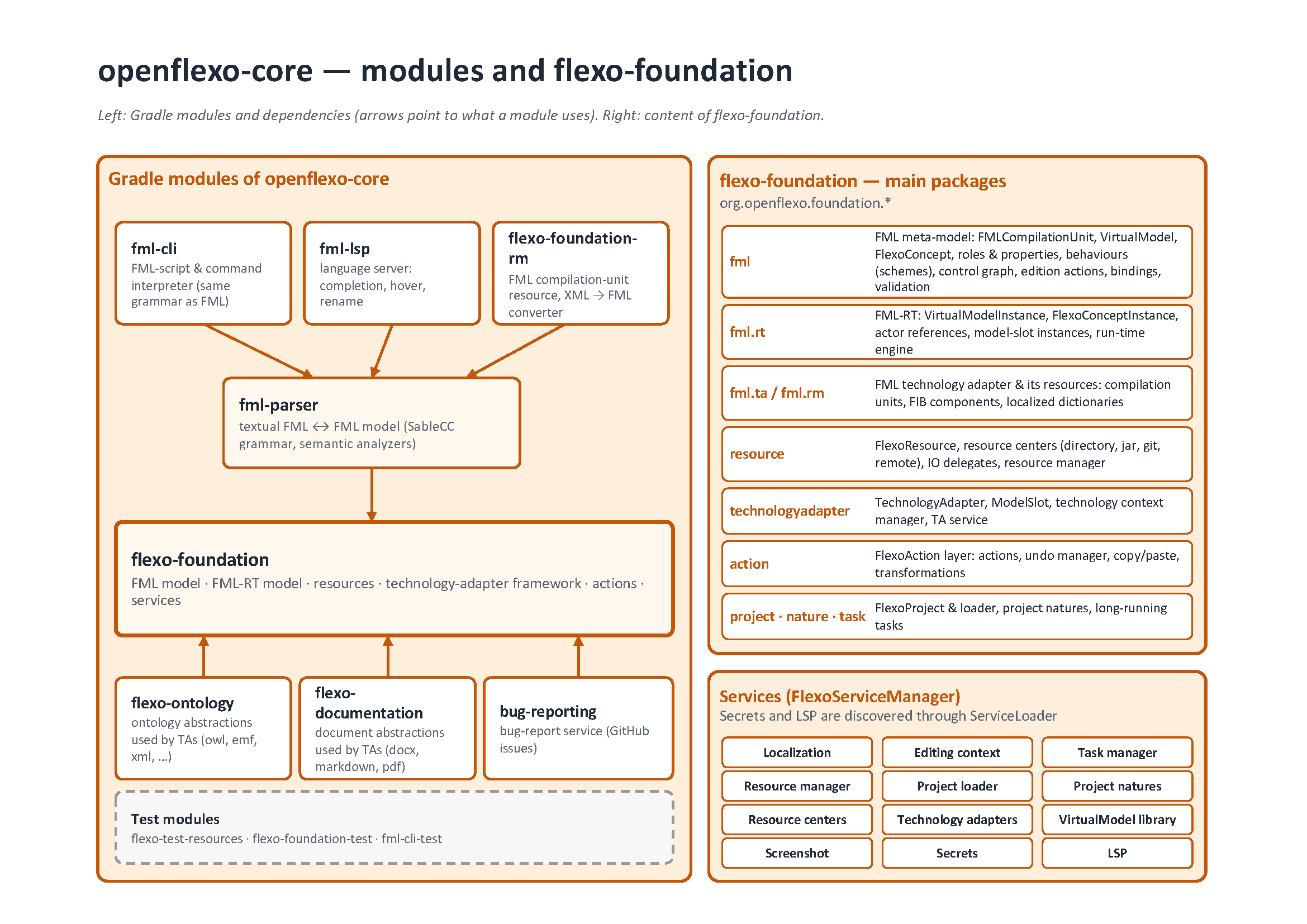
fml-cli (scripts and commands), fml-lsp (the language server) and flexo-foundation-rm (FML
resources) all depend on fml-parser, the textual FML ↔ model conversion, which itself depends on
flexo-foundation: the FML and FML-RT models, resources, technology adapters and services. Also in
openflexo-core: flexo-ontology, flexo-documentation, bug-reporting, and the test modules.
The rules that hold it together
- No dependency goes up.
openflexo-utilsknows nothing of the rest of the infrastructure,connieandpamelaknow nothing ofopenflexo-core; the core knows nothing of a technology adapter. - A technology adapter never depends on another one. It depends on the core and below. Code useful to several adapters belongs in the core or in a shared library, not in one of them.
- Model objects are PAMELA interfaces, not plain classes. A model type is an interface
annotated
@ModelEntity, whose state is declared with@Getterand@Setterand whose behaviour lives in default methods or an@Implementationclass. PAMELA supplies the storage, the notifications, the cloning and the validation: a field added to an implementation class is neither persisted nor notified. This is the most common surprise for a newcomer. - Model data is reached through Connie bindings, where the surrounding code does so. Calling getters by hand around them breaks FML evaluation and change propagation.
- The FML syntax is defined in one grammar,
fml-parser/src/main/sablecc/fml.sablecc. Parsers are generated from it, never edited (see Build and test). Commands and.fmlscriptfiles are parsed by that same grammar, through separate entry points — there is no second, standalone grammar for them. See Runtime for what happens once a file is loaded. - Resource centers are identified by their base URI, which must be unique on the classpath. A
jar declares its resource center in
META-INF/resourceCenters/org.openflexo.foundation.resource.FlexoResourceCenter; when two share a URI, the second is silently skipped, with no error.
From a file to a running model
The layers meet at run time as follows. A resource center makes resources visible. A technology adapter knows one kind of resource and offers model slots to reach it. An FML virtual model declares those slots and the concepts built on them, and executing it creates a virtual model instance. The vocabulary defines each of these terms; Resources and their life cycle and Runtime go into how a resource is discovered and how start-up, loading and behaviour execution actually proceed.
Where to look for what
| To… | Look in |
|---|---|
| change the FML syntax | openflexo-core/fml-parser (the grammar, then the hand-written factories that walk the new nodes) |
| add or change a base model entity | openflexo-core/flexo-foundation |
| support a new kind of resource | a new technology adapter, see Write a technology adapter |
| change a screen | the .fib and .inspector files of the module concerned, built on gina |
| change what a package contains | openflexo-packaging |
| bump the version of a component | the buildconfig of openflexo-buildplugin, nowhere else |